

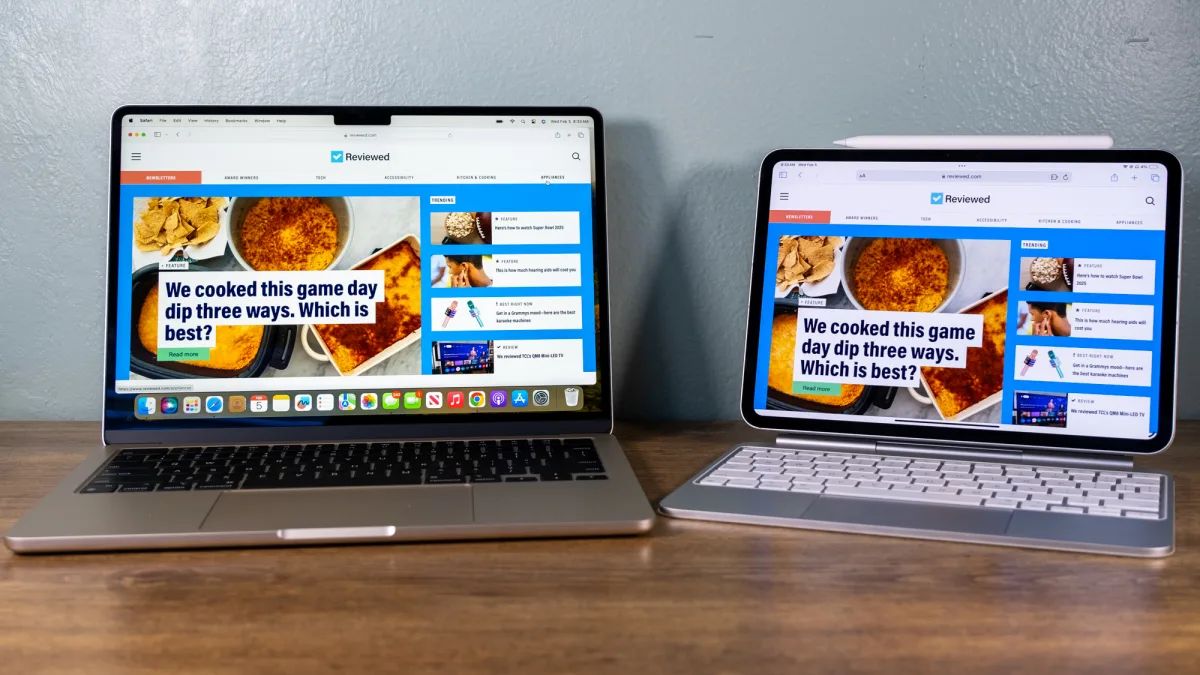
The iPad Pro vs MacBook Air debate in 2026 centers entirely on your workflow. If you need a “file-first” environment for coding, heavy writing, or traditional multitasking, the MacBook Air is superior. However, if your work is “creative-first”—involving drawing with an Apple Pencil, high-end photo editing, or modular media consumption—the iPad Pro offers a more versatile, tactile experience that the laptop cannot match.
The frustrating truth is that in 2025, both devices run Apple’s M-series chips and are genuinely powerful. The gap that used to make this an easy decision – MacBook Air was clearly more capable – has narrowed significantly. What separates them now is software ecosystem and input method, not raw performance.
iPad Pro vs MacBook Air – Which Should You Choose?
Buy the MacBook Air if: you run desktop software, need multiple windows open simultaneously, write or code for extended sessions, or rely on software that does not have an iPad version.
Buy the iPad Pro if: you draw, sketch, or annotate (Apple Pencil is genuinely transformative), consume media in high quality, want something lighter and more flexible in how you hold and use it, or already own a Mac desktop and need a complementary portable device.
Key Specs Comparison
| Feature | iPad Pro M4 (2024) | MacBook Air M3 (2024) |
| Chip | Apple M4 | Apple M3 |
| Display | 11″ or 13″ OLED (Ultra Retina XDR) | 13.6″ or 15.3″ Liquid Retina |
| Resolution (13″) | 2752 x 2064 – 264 PPI | 2560 x 1664 – 224 PPI |
| RAM | 8GB or 16GB | 8GB, 16GB, or 24GB |
| Storage | 256GB to 2TB | 256GB to 2TB |
| Battery Life | Up to 10 hours | Up to 18 hours |
| Weight (13″) | 582g (1.28 lbs) | 1.51 kg (3.3 lbs) |
| Keyboard included? | No – sold separately | Yes |
| Starting Price | $999 (11″) / $1,299 (13″) | $1,099 (13″) / $1,299 (15″) |
| Cellular option? | Yes | No |
| Apple Pencil support? | Yes – Apple Pencil Pro | No |
Display and Design
The iPad Pro’s OLED display is, objectively, better than the MacBook Air’s LCD in every measurable way – deeper blacks, higher contrast ratio, more accurate colours, and extreme brightness that makes it usable in direct sunlight. The 13-inch iPad Pro’s Ultra Retina XDR display is one of the best screens Apple has ever shipped on any device.
The MacBook Air’s Liquid Retina display is not bad – it is genuinely excellent by any standard other than direct comparison to an OLED panel. For most productivity work – documents, spreadsheets, code – the difference is imperceptible. For photo editing, video work, or anything colour-critical, the iPad Pro wins clearly.
In terms of physical design, the iPad Pro at 582g is dramatically lighter than the MacBook Air at 1.51kg. For travel, commuting, or reading in bed, that weight difference is felt immediately. The MacBook Air’s advantage is that it comes with a keyboard and trackpad built in – the iPad Pro needs the Magic Keyboard accessory (an additional $299-$349) to function comparably as a laptop.
Performance – How Do They Compare for Real Tasks?
Everyday Productivity
Both devices handle email, web browsing, documents, video calls, and light photo editing without any perceptible difference. The M3 and M4 chips are both so far ahead of what most tasks require that everyday productivity is not a meaningful differentiator.
Where the MacBook Air wins for productivity is multitasking. iPadOS Stage Manager has improved significantly but still does not match macOS for running multiple windows from multiple apps simultaneously. If your workflow involves frequent switching between five or more applications with specific window sizes and arrangements, the MacBook Air’s macOS environment is noticeably more comfortable.
Creative Work – Video, Photo, Design
For video editing, both handle Final Cut Pro (available on both platforms). For photo editing in Lightroom and Capture One, the iPad Pro’s OLED display gives it an edge in colour accuracy. For illustration, the Apple Pencil Pro on the iPad Pro is simply not replicable on the MacBook Air – it is one of the best digital drawing experiences available at any price.
If your creative work involves drawing, sketching, digital art, or annotating documents heavily, the iPad Pro is the clearly superior tool. The Apple Pencil Pro with its tilt and pressure sensitivity and the OLED display makes creative work feel genuinely different from anything a laptop trackpad can offer.
Programming and Development
MacBook Air wins this decisively. Xcode (the Mac development environment) has no full iPad equivalent. Terminal, local development servers, Docker, and the full suite of developer tools are macOS-native. While you can write some code on an iPad Pro with apps like Working Copy or Buffer Editor, anyone doing serious development work will find the MacBook Air’s full macOS environment essential.
Software and App Ecosystem
This is still the most important practical difference between the two devices. macOS runs full desktop applications – software built for decades on the assumption of a keyboard, mouse, and large screen. Many professional tools exist only on macOS or have iPad versions that are meaningfully less capable.
iPadOS has caught up significantly in recent years. Microsoft Office, Adobe Creative Suite, Final Cut Pro, Logic Pro, and thousands of professional apps now have strong iPad versions. But ‘strong iPad version’ is not always ‘identical to Mac version’ – and for power users of specific software, that difference matters.
Price Comparison
| Device + Config | Storage | Price (USD) |
| iPad Pro 11″ (M4) | 256GB WiFi | $999 |
| iPad Pro 13″ (M4) | 256GB WiFi | $1,299 |
| iPad Pro 13″ + Magic Keyboard | 256GB WiFi + keyboard | ~$1,648 |
| iPad Pro 13″ + Keyboard + Pencil Pro | 256GB + accessories | ~$1,777 |
| MacBook Air 13″ (M3) | 256GB / 8GB RAM | $1,099 |
| MacBook Air 13″ (M3) | 512GB / 16GB RAM | $1,499 |
| MacBook Air 15″ (M3) | 256GB / 8GB RAM | $1,299 |
Who Should Buy the iPad Pro?
The iPad Pro is the right choice for artists, illustrators, and designers who use Apple Pencil as a primary input tool. It is also the right choice for people who already own a Mac (desktop or laptop) and want a complementary device for reading, media, travel, and lighter tasks. Students who annotate PDFs and textbooks heavily will find the combination of display quality and Apple Pencil genuinely transformative.
It is also the right choice for someone who genuinely does not need a traditional laptop – whose entire workflow fits within strong iPad apps and who prefers the flexibility of a tablet form factor.
Who Should Buy the MacBook Air?
The MacBook Air is the right choice for most people as a primary computer. Writers, coders, students doing research-heavy work, anyone using professional software with no iPad equivalent, and anyone who does not want to think about accessories – the MacBook Air is the more complete out-of-box computer experience.
The 15-inch model in particular is worth considering for anyone who works primarily from home or at a desk – the larger display is genuinely useful for day-to-day work and the price premium over the 13-inch is modest.
Frequently Asked Questions
Can the iPad Pro replace a laptop completely?
For some people, yes. For most people, no. The iPad Pro can handle the majority of everyday computing tasks. But if your work involves specific desktop software, serious coding, or complex file management across many applications, you will hit iPadOS limitations regularly.
Is the M4 iPad Pro significantly faster than the M3 MacBook Air?
In raw benchmarks, the M4 chip edges out the M3. In real-world day-to-day use, both are so fast that you will never notice the difference performing everyday tasks. The chip generation is not a meaningful purchase deciding factor between these two devices.
Do I need the Magic Keyboard for the iPad Pro?
If you plan to use the iPad Pro as a laptop replacement, yes – typing on glass for extended sessions is not comfortable. The Magic Keyboard with trackpad makes the iPad Pro genuinely laptop-like, though it adds $299-$349 to the cost and significant weight.
